How Do I Upload Contacts to My ChowNow Marketing List?
ChowNow’s Marketing Suite is designed to help you reach your full customer base — not just the diners who order online. By uploading your current marketing list, you can combine walk-ins, reservations, and other marketing sign-ups with your online ordering data into one unified list.
Note: In-Store CSV List upload is available with ChowNow Grow and Elevate plans. Restaurants that upload their on-premise marketing list typically see up to 3x growth in their marketable audience, giving every campaign more reach and more revenue potential. Reach out to [email protected] to learn about upgrading.
How to Upload a Contact List
- Log in to your ChowNow dashboard.
- Click on “Headquarters”, then the name of your location.
- Navigate to “Marketing” > “Campaign Settings”.
- In the “CONTACT LIMIT” section, click “Import”.

Step 1 – Select contact type
- Select the contact type that you are uploading — email or SMS.
- Review and acknowledge the legal disclaimer before proceeding.
- Click “NEXT”.
For SMS Only: When importing SMS contacts, you will also need to provide information about how the contacts were obtained, how often they are updated, and whether or not they have recently engaged with marketing.

Step 2 – Upload your list
- Upload your CSV file by clicking “BROWSE”, or drag and drop the file into your window.
- Click “NEXT”.
Before importing your list, review it against the guardrails below (jump to “What Makes a Contact List ‘Healthy’?). This step is critical — importing a list that doesn’t meet these standards can hurt your campaign performance and, in some cases, get your sending number flagged by email and SMS providers.

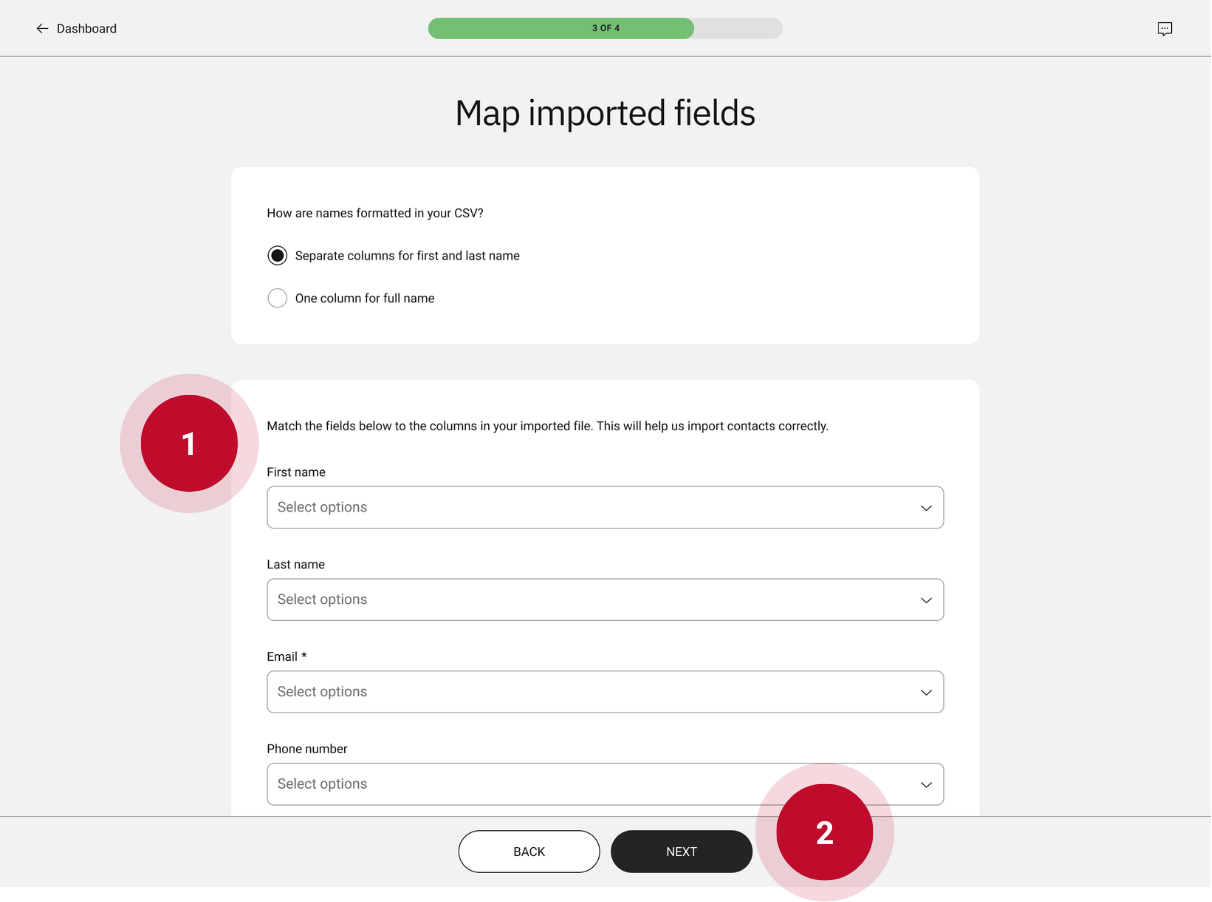
Step 3 – Map imported fields
- Match each field shown to a column in your CSV file. For example, your file may label the email address column as “Contact info”. To ensure a clean import, match “Email” to “Contact info”.
- Click “NEXT”.
Step 4 – Review contact
- ChowNow’s system will scan the file provided and flag any errors or warnings.
- Click “IMPORT”.
- You can track the progress of your list import on the “Campaign Settings” page.

Preparing Your Contact List
- File Format: The file must be in CSV format, up to 20MB
- Required Fields: A valid email address is required for all list imports, even SMS contact
- Recommended Fields: Email Address, First Name, Last Name, Phone Number
![]()

What Makes a Contact List “Healthy”?
Email and SMS providers track how people engage with your messages. If too many recipients ignore them or mark them as spam, your future messages get filtered to junk — or blocked altogether. That’s why a healthy list starts with people who actually want to hear from you.
Before importing your list, confirm:
- These contacts have received marketing emails from your restaurant in the last 12 months, and/or
- These contacts have received marketing texts from your restaurant in the last 6 months
Any contact who hasn’t received recent digital marketing from you should be removed. When in doubt, leave them out — it’s better to start with a smaller, engaged list than risk deliverability problems that affect every campaign you send.
Where Your List Should Come From
Not all contact lists are created equal. Here’s what we accept:
- Preferred sources: Marketing lists from a previous email or SMS platform, online reservation systems, or other tools where diners actively opted in to hear from your restaurant.
- Requires confirmation: Contact lists pulled from your POS. These often include customers who paid by card or signed up for a receipt, but didn’t necessarily agree to receive marketing. Before importing a POS list, confirm these contacts opted in to marketing communications.
- Not accepted: Purchased or rented lists. These violate email and SMS marketing laws (including CAN-SPAM and TCPA), put your restaurant at legal risk, and almost always result in spam complaints that damage your sender reputation.