Getting Started with Automated Email & SMS Campaigns
What’s included
Automated campaigns come preloaded with your restaurant’s brand assets and ChowNow-recommended promos — no campaign management or marketing expertise required. They include lifecycle moments like Welcome, Win Back, and VIP, plus monthly and seasonal promotional sends.
Note: For restaurants on ChowNow Grow and Elevate, both email and SMS channels will be triggered as part of these campaigns. For restaurants on Launch, campaigns are limited to email only.
See also: What Automated Emails & Texts Are Sent to My Diners?
Where to find them
In your ChowNow Dashboard, select the “Marketing” tab in the left-hand navigation, then choose “Automated Campaigns”.
How automated campaigns work
All automated campaigns are enabled by default, so they start working for you the moment you’re set up. If you’d prefer to turn off a particular campaign, navigate to “Marketing” > “Automated Campaigns” and toggle the campaign “off”.
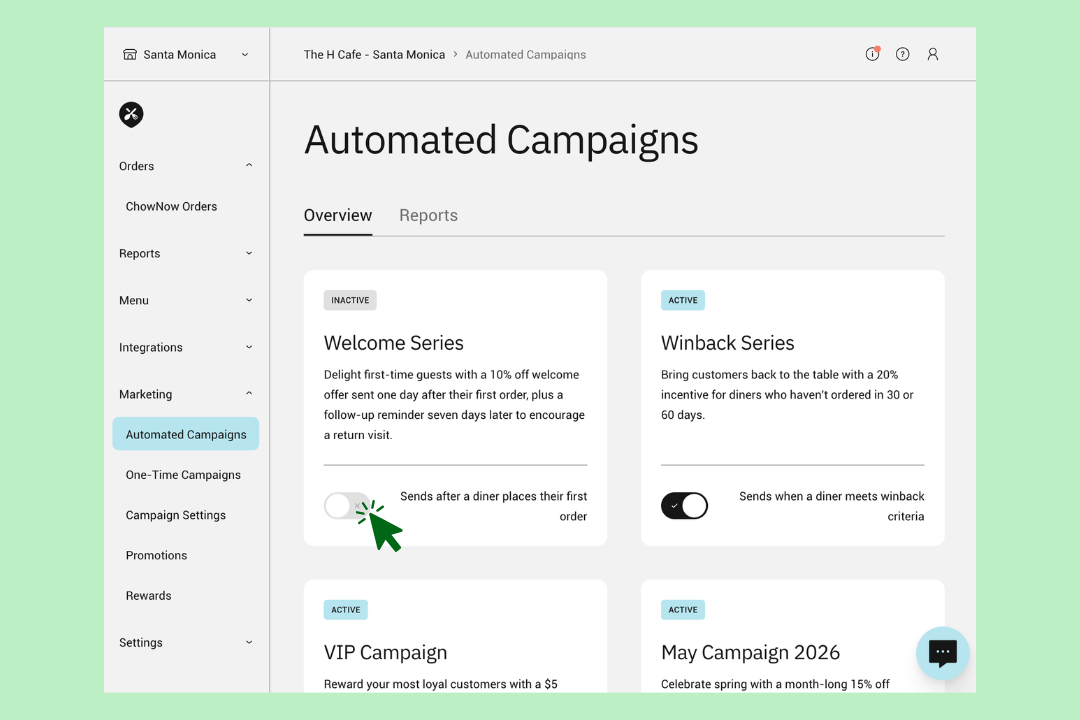
Important: For campaigns scheduled to send on a set date, like monthly and seasonal touchpoints, the campaign must be toggled off at least 24 hours prior to the send date.
Campaign content & promotions
The content and promotions within automated campaigns cannot be edited at this time. They’re built and optimized by ChowNow to drive repeat orders right out of the box. For all percent-off promos, there’s a $10 maximum discount cap built in as a margin guardrail — so you get the marketing lift without the runaway discount risk.
Want to launch a custom campaign?
If you’d like to promote a specific event, offer, or moment with your own messaging, check out our guides for getting started with Custom Email and SMS Campaigns. Custom On-Demand Campaigns are available on ChowNow Grow and Elevate plans.