Restaurant Email Marketing That Drives Repeat Customers

Most restaurants that try email marketing and give up aren’t wrong about the channel — they’re wrong about the approach.
Sending a monthly newsletter to your full list and wondering why orders aren’t going up is a reasonable experiment. It’s just not email marketing. Real restaurant email marketing is behavior-triggered, audience-specific, and largely automated. When it’s built that way, a restaurant with a 1,000-diner email list can generate approximately $10K in annual attributed revenue from automated campaigns alone — before a single one-time promotion is ever sent.
This guide covers the five campaigns that produce that result, how to segment your list so every message lands with the right guest, and how to run all of it without a marketing team.
Why Most Restaurant Emails Don’t Drive Results
The most common reason restaurant email underperforms isn’t deliverability, design, or subject lines. It’s that most restaurants send the same message to everyone at once — what marketers call batch-and-blast — and expect it to perform like a targeted campaign.
It doesn’t, for a simple reason: a guest who ordered from you yesterday doesn’t need a win-back message. A first-time diner doesn’t need a VIP reward yet. A lapsed customer who hasn’t ordered in 90 days needs a very different message than someone who orders every week.
When every guest gets the same email, most guests ignore it — because most of the time, it isn’t relevant to them. The fix isn’t more emails. It’s better targeting, and it starts with knowing who’s on your list.

Targeted, segmented campaigns drive 77% of total email revenue — yet most restaurants still send generic blasts to their entire list.
The 5 Email Campaigns Every Restaurant Needs
These five campaigns cover the full customer lifecycle — from the first order to long-term loyalty — and they all run automatically once they’re set up. No ongoing effort required.
1. Welcome
When it sends: After a guest’s first order.
What it does: Confirms their order, introduces your restaurant’s story, and sets up the next visit — whether that’s a small incentive, a mention of your rewards program, or simply a warm note that makes them feel like a regular before they’ve had a chance to become one.
Why it matters: The window between a first and second visit is the highest-leverage moment in the customer lifecycle. A well-timed welcome email shortens that window by giving the guest a reason to return before the memory of the first experience fades.
Example subject line: “Welcome to [Restaurant Name] — here’s what’s next”
2. Post-Order Follow-Up
When it sends: 24–48 hours after an order.
What it does: Thanks the guest for their order, invites a review, and nudges them toward the next visit — either with a soft reminder or a preview of something new on the menu.
Why it matters: Most guests who leave happy don’t leave a review unless they’re asked at the right moment. A post-order email catches them when the experience is fresh. It also reinforces the habit loop: order, hear from you, return.
Example subject line: “How was your [menu item]? We’d love to know.”
3. Win-Back
When it sends: 30, 60, or 90 days after a guest’s last order, with no new order in between.
What it does: Reconnects with a guest who has gone quiet, typically with a personalized message and an offer or reward worth acting on.
Why it matters: A lapsed guest already knows your food. They don’t need to be convinced — they just need a reason to come back now. A win-back email with a relevant offer is one of the highest-converting campaigns in restaurant marketing, and it costs nothing unless the guest redeems.
Example subject line: “It’s been a while — here’s something for your next order
4. VIP / Loyalty
When it sends: When a guest reaches a milestone — typically 4+ orders, a spending threshold, or a set number of visits.
What it does: Recognizes the guest’s loyalty explicitly, rewards them for it, and reinforces the behavior you want to continue.
Why it matters: Your highest-value customers are also your most at-risk if they ever feel taken for granted. A VIP email that arrives at exactly the right milestone makes a loyal guest feel seen — and significantly increases the likelihood they stay loyal. It also introduces the rewards program naturally, for guests who may not have engaged with it yet.
Example subject line: “You’ve officially earned VIP status — here’s your reward”
5. Seasonal
When it sends: Timed to relevant moments — holidays, local events, your own restaurant’s anniversary, the start of patio season.
What it does: Gives guests a timely reason to order that feels connected to something happening in the world, not just a promotional push.
Why it matters: Seasonal emails have some of the highest open rates in restaurant marketing because they arrive when guests are already thinking about food and occasion. A well-timed message around Mother’s Day, game day, or a local festival turns ambient demand into a direct order.
Example subject line: “Mother’s Day is Sunday — order ahead before we sell out”
Segmentation: Why the Right Audience Matters as Much as the Right Message
The five campaigns above work significantly better when they reach the right guests, and significantly worse when they don’t.
Sending a win-back email to someone who ordered yesterday isn’t just irrelevant — it signals that you don’t know who they are, which erodes the relationship rather than building it.
The four segments that drive the most email revenue for independent restaurants are:
- New Guests — anyone who has placed their first order.
- Primary goal: convert to a second visit.
- Best campaign: Welcome.
- Repeat Guests — guests with 2–3 orders.
- Primary goal: build the habit.
- Best campaign: Post-order follow-up, Seasonal.
- VIP Guests — guests with 4+ orders or above a spending threshold.
- Primary goal: recognize and retain.
- Best campaign: VIP/Loyalty, exclusive previews.
- Lapsed Guests — guests who haven’t ordered in 30, 60, or 90 days.
- Primary goal: reactivation.
- Best campaign: Win-Back with an offer.
The good news is that building and maintaining these segments manually isn’t something most operators have time for — and it doesn’t need to be. When email marketing is connected to your ordering platform, segments update automatically based on real order behavior. New guests move to Repeat when they order again. Repeat guests move to VIP when they hit the threshold. Lapsed guests enter the win-back flow automatically when they go quiet.
Ready to see how this all comes together in one platform? Book a demo to see how it works.
How to Increase Repeat Orders with Rewards Inside Email
Email campaigns that mention a reward waiting for a guest — or how close they are to earning one — consistently outperform campaigns that don’t. There are three moments where this works particularly well.
- Reward reminders go to guests who have earned a reward but haven’t redeemed it. Subject line: “Your reward is waiting — use it before it expires.” These have some of the highest conversion rates in restaurant email because the guest has already done the work to earn it. The email just needs to prompt the action.
- Bounce-back offers go out after a first order with a small incentive tied to the second visit. “Come back within 7 days and your next order includes a free [item].” These work because the offer is specific, time-limited, and arrives when the first experience is still fresh.
- Progress nudges tell a guest how close they are to their next reward. “You’re 2 orders away from your next VIP reward.” These are simple, low-cost, and highly effective at accelerating the habit loop — particularly for guests who are engaged but haven’t quite locked in a pattern yet.
All three of these are most effective when they’re automated and connected to real ordering data.
How to Automate Restaurant Email Without a Marketing Team
The barrier for most independent restaurants isn’t willingness — it’s bandwidth. Setting up campaigns, writing copy, maintaining lists, tracking performance — none of that fits inside a shift.
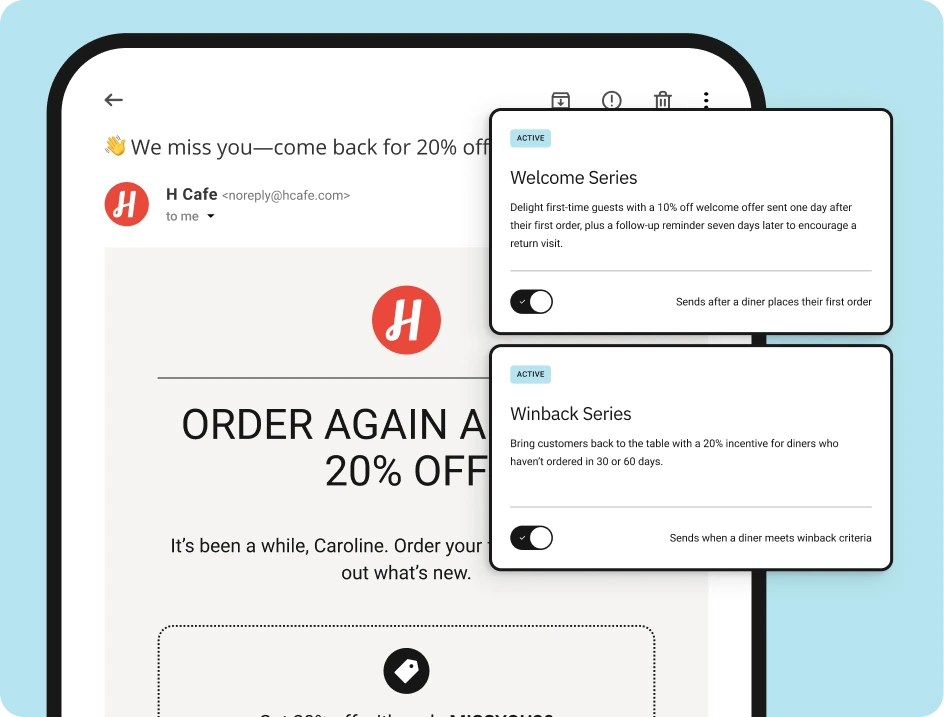
ChowNow’s automated email marketing is built specifically for this constraint. The five campaigns above come pre-built, connected to your ordering data from day one. Here’s what that means in practice:
- Pre-built campaign flows are ready to activate. Welcome, Win Back, VIP, and Seasonal campaigns are already written and structured. You turn them on — they run, adjust to your guest behavior, and keep working without ongoing maintenance.
- Segmentation is automatic. New, Repeat, VIP, and Lapsed audiences are generated from real order activity.
- Your full customer base is reachable. For guests who dine in or place phone orders, a simple CSV upload connects your on-premise guest list with your online customers — giving you one unified list that covers everyone you’ve served, not just the guests who ordered through your website.
- Reporting is tied to revenue, not just opens. Every campaign shows attributed orders and revenue alongside standard engagement metrics — so you always know what’s actually driving repeat business, not just what’s getting clicked.
- On-demand campaigns take minutes. When you want to send a one-time promotion, announce a new menu, or push a limited-time offer, the built-in editor has your branding already loaded. From idea to send in a few clicks, without leaving your ChowNow dashboard.
The result is a marketing program that works while you’re running service — not something that adds to the list of things you have to manage.
If you’re looking for more ideas on turning first-time diners into regulars, here’s what works for restaurant customer retention.
Frequently Asked Questions
How often should a restaurant send marketing emails?
Automated campaigns send based on guest behavior, so frequency varies by individual. For one-time campaigns, most independent restaurants see strong engagement at 2–4 sends per month. More than that risks opt-outs; less leaves repeat revenue on the table. The key is relevance — a guest who just ordered doesn’t need a weekly promotion, but a guest who hasn’t visited in 60 days should hear from you.
What should a restaurant welcome email include?
At minimum: a thank-you for the order, something that conveys your restaurant’s personality, and a reason to come back — whether that’s a soft incentive, a mention of your rewards program, or a preview of what else is on the menu. Keep it short. The goal isn’t to overwhelm a new guest with information — it’s to make them feel good about their first choice and give them a clear path to a second one.
How do I build an email list for my restaurant?
The most effective approach is to capture guest information at the point of order. Online orders through ChowNow collect guest contact information automatically. For dine-in guests, QR Code Ordering captures names, emails, and phone numbers at checkout — and restaurants using it have grown their marketing lists by 40% or more. For walk-ins and phone orders, uploading a CSV with your on-premise guest data connects your full customer base to your marketing in one step.
Do I need a marketing tool separate from my ordering system?
Not with ChowNow. Email marketing is built directly into the same platform as your online ordering, so campaigns are automatically powered by real ordering data — no integrations, no exporting lists, no reconciling two systems. For more on how ChowNow’s tools work together, see the full feature breakdown.
How is automated email different from a newsletter?
A newsletter goes to your full list on a set schedule, regardless of who receives it or what they’ve done recently. Automated email sends based on specific guest behavior — a first order, a lapse in visits, a milestone reached. Automated campaigns are more relevant, more personal, and dramatically more effective at driving repeat orders. Targeted, segmented campaigns drive 77% of total email revenue for restaurants that use them.